
MUEDvox
One vocal in, up to four voices out — each sung a different way.
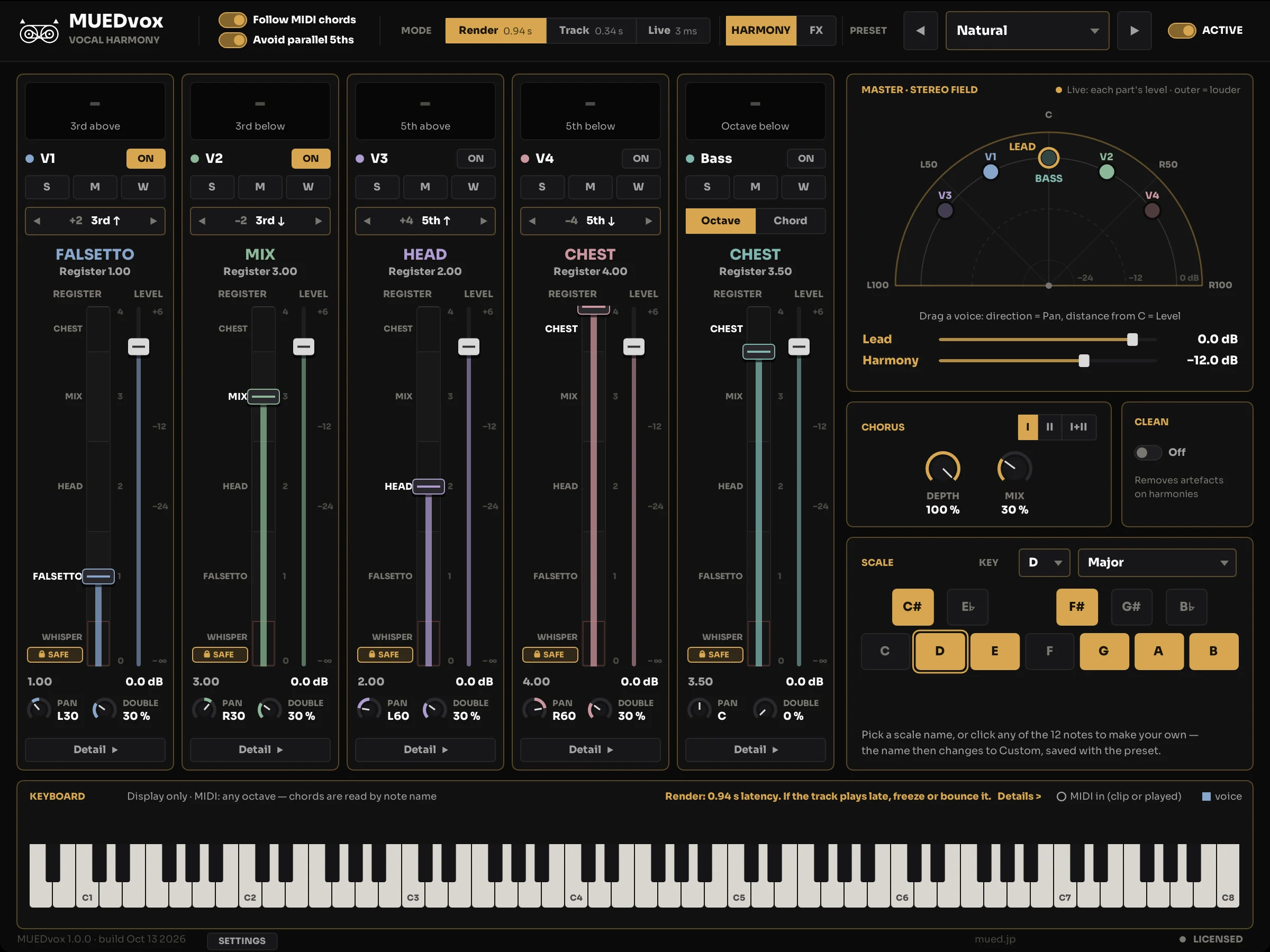
Vocal harmonies that follow your key and chords. Feed MUEDvox a lead vocal. It writes up to four harmony voices and a bass part that stay in key and move with your chords. Made in Tokyo by a working composer and engineer.
Try the demoScreen
Three things it does
- It follows the key and the chords.
- Set the key and scale, or send the chords as MIDI. The harmony parts are chosen from them, so the same melody note gets a different harmony when the chord underneath changes. It follows modulations, keeps parts moving smoothly from one chord to the next, and holds steady through short passing notes instead of chasing each one.
- Each voice has its own register.
- A lever on every voice sets how it is sung: whisper, falsetto, head, mix or chest. The harmonies stop sounding like one voice copied four times.
- Built to sit in a mix.
- Up to four voices plus a bass part, a doubler and a chorus, and a formant control for each voice. Check it the way you would any vocal: in the full mix.
Three modes
| Mode | Latency | Use it for |
|---|---|---|
| Render | 0.94 s | The cleanest sound. It reads ahead before it sings, so it is 0.94 s late. In Pro Tools, commit the track. In other DAWs, freeze or bounce the track if it plays late. |
| Track | 0.34 s | Close to Render with a third of the latency. You can mix with the plugin on the insert. |
| Live | 3 ms | For singing or playing along. |
Latency is the value the plugin reports to your DAW. The time from a chord change to the harmony changing is longer than that.
Formats and requirements
- Formats
macOS: AU, VST3 and AAX. Windows: VST3.
The Windows version is an unsigned zip. Windows may show a warning.
- Requirements
Input: one mono lead vocal per instance.
A DAW that hosts one of the formats above.
Buy and demo
One-time purchase, USD 69. Not a subscription.
Sign in to mued.jp with the email you use at checkout to get your license key in your portal.
After purchase, the download link and the steps to get your license key are emailed to you. The key itself is in your buyer’s portal on mued.jp (sign in with a code sent to your email; keys are not sent by email). Drag the license.key file onto the plugin, or use "Load license file…" or "Paste license key". No online activation. No background app.
FAQ
- How much delay does it add?
- It depends on the mode. Render is 0.94 s, Track is 0.34 s and Live is 3 ms (the value the plugin reports to your DAW). Render reads ahead, so in Pro Tools you commit the track. To sing or play along, use Live.
- Does it work on Windows?
- Windows: VST3. macOS: AU, VST3 and AAX.
- Does it work in Pro Tools?
- AAX for macOS is included.
- What do I need to give it?
- One mono lead vocal on the track it is inserted on, and the key — set by hand, or sent as MIDI chords. Without chords it works from the key and scale you set.
- Does it turn my voice into someone else's?
- No. The harmony parts are made from your own recording.
- Does it come with presets?
- Seven: Natural, Clean, Wide Stack, Stack + Bass, Vintage Chorus, Plate Duo and Wide Duo. A preset switches the harmony and the FX together. Choosing one does not change Key, Scale or Mode.
- How do I get my license key?
- After you buy, you are emailed a download link and the steps to get your key. The key is in your buyer's portal at mued.jp: sign in with the email address you used at checkout (a code is sent to that address). Drag the license.key file onto the plugin, or use "Load license file…" or "Paste license key". The plugin does not go online to activate, and there is no background app.
- What does the demo do?
- It is the full plugin with no time limit. Each time you insert it, the harmonies play for the first 45 seconds; after that only your lead vocal keeps playing (insert it again for another 45 seconds). Settings you change in the demo aren't saved with your session.
- Can I get a refund?
- FastSpring is the Merchant of Record and handles refunds under the MUED Refund Policy. Purchases are generally non-refundable once the license key has been delivered, except for a billing error or a confirmed technical problem that prevents use. If the plugin does not run on a supported system, write to support@mued.jp first. The demo lets you check that it runs in your setup before you buy.
EULA and third-party software
EULAMUEDvox includes third-party software. The required notices are included with the plugin.